The New User Interface Standard Introduced by RTN LAI 5
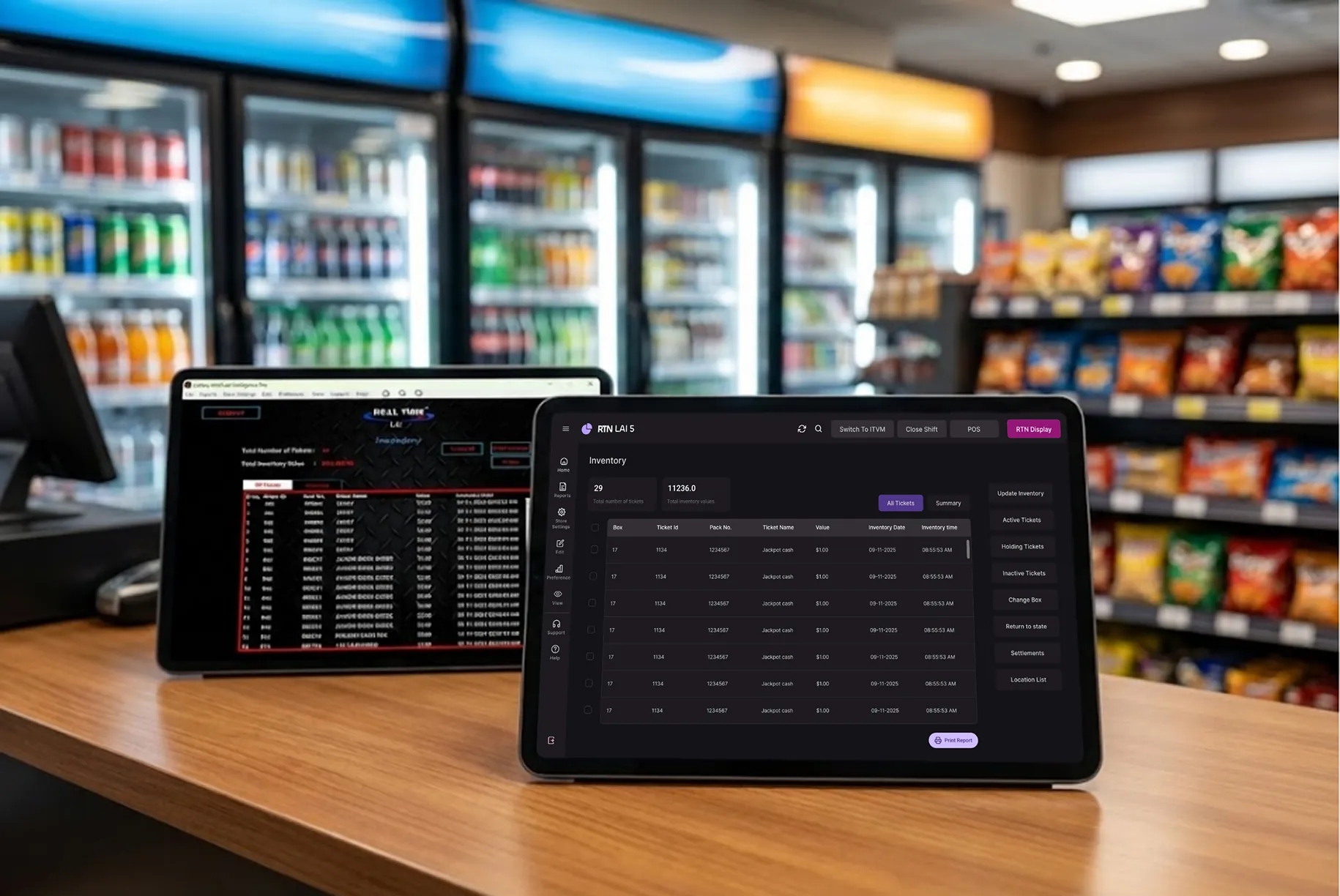
.Running a lottery store means constant screen time. When menus feel messy or buttons are hard to find, work slows down. Small delays turn into long lines. Mistakes happen. Stress builds.
RTN LAI 5 changes that experience. The system focuses on clarity, speed, and control so daily tasks feel easier from the first login.
A Dashboard That Works the Way You Do
Most store systems force you to adjust your habits. LAI 5 does the opposite. The dashboard layout is built around real store workflows.
You see the most used sections first. Key actions stay within reach. Data is easier to scan without hunting across the screen. That reduces hesitation during busy periods and helps staff stay confident while serving customers.
What this means in daily use:
- Faster ticket checks
- Less time switching between pages
- Fewer missed steps during busy hours
- More confidence for new employees
The goal is simple. You spend less effort managing the system and more time serving customers.
Personal Control Over Your Workspace
Long shifts affect focus. Bright screens during night hours can cause eye strain. LAI 5 gives you control over how the interface looks.
Two display modes are available:
| Mode | Best Use |
|---|---|
| Dark Mode | Night shifts or low lighting |
| Light Mode | Daytime or bright stores |
Switching takes one click. No restart needed.
Comfort matters. When your eyes feel better, your attention stays sharp. Over long working hours, even small visual comfort improvements can reduce fatigue and help maintain accuracy.
Workflow Changes That Save Real Time
Small design changes can remove minutes from repeated tasks. Over a week, that becomes hours. When actions require fewer clicks, staff can focus more on customers instead of screens.
Three workflow upgrades stand out.
1. Action Sidebar
Important buttons now sit in one vertical panel. No searching across the screen. No confusion about where to click next.
Result: faster decisions during peak hours.
2. Improved Data Tables
Ticket lists now have better spacing, clear headers, and aligned columns. Numbers are easier to read quickly.
Result: quicker scanning and fewer errors.
3. Cleaner Forms
Inventory updates use structured pop-up windows with logical field order.
Result: faster data entry and less frustration.
These improvements reduce mental load. Staff don’t need to pause and think about navigation. They simply continue working.
Navigation That Feels Natural
Many systems hide options inside layers of menus. RTN LAI 5 keeps navigation clear.
Sections are grouped in a logical order:
- Active
- Holding
- Inactive
- Sold Out
- Returned
Context-based actions appear only when needed. The screen stays clean instead of crowded with unused buttons.
When navigation makes sense, training new staff becomes easier too. Employees learn faster because screens match the way tasks happen in real life.
Why Visual Order Matters More Than You Think
A busy screen forces your brain to work harder. When everything looks equal, nothing stands out.
LAI 5 uses visual priority to guide attention:
- Main tabs stand out clearly
- Secondary actions stay subtle
- Important buttons remain easy to spot
- Content areas stay separated from controls
Your eyes move naturally to the right place. That reduces mental effort during long shifts and lowers the chance of mistakes during rush periods.
Built on a Strong System Foundation
This version is not just a visual update. It uses a structured design system underneath.
That foundation allows:
- Consistent layout across screens
- Faster future updates
- Easier feature expansion
If you rely on lottery management software every day, long-term stability matters. The system should grow without disrupting your workflow.
What You Can Do to Get the Most Value
Here are three simple ways store owners can benefit faster after switching:
- Customize your view early
Spend a few minutes adjusting layout preferences and display mode. Comfort improves productivity. - Train staff using real tasks
Show employees common actions like scanning, inventory updates, and status checks. Hands-on learning sticks better. - Use the sidebar consistently
Encourage staff to rely on the new action panel. Muscle memory builds speed over time.
These steps help teams adapt within days instead of weeks.
What Changes After One Week of Use
Store owners usually notice clear differences quickly:
- Fewer clicks to complete tasks
- Faster ticket handling
- Less eye fatigue
- Lower error rates
- More confidence using the system
- Smoother staff coordination during peak hours
The software stops feeling like an obstacle. It becomes a tool that supports your pace.
The Bottom Line
RTN LAI 5 focuses on clarity, control, and efficiency. Cleaner screens. Logical navigation. Smarter workflows. Daily work feels lighter and more predictable.
When the system stays out of your way, you can focus on customers and sales.